Timeline and transitions
As many video and audio layers as you need, with trimming, ripple delete, snapping and markers. Dissolves, wipes and slides between clips, crossfades between sounds.


Cut footage, add titles and captions, and animate layered Illustrator or SVG artwork — all on one timeline, on your computer.
Every AI tool runs on your computer. Your footage never leaves it.
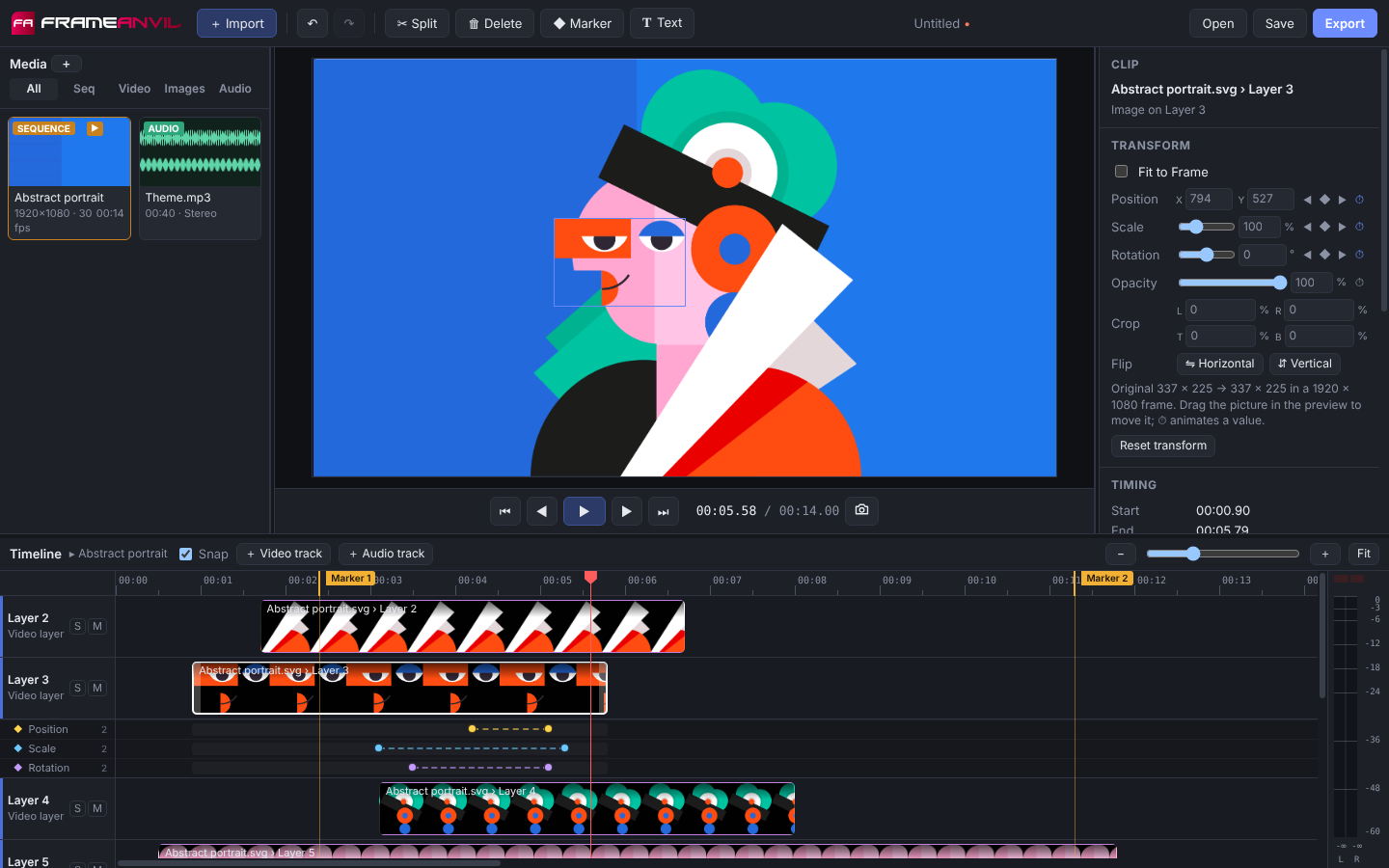
Design in Illustrator, Inkscape, Figma or Affinity, then animate it next to your footage: logo reveals, animated illustrations and title cards, without learning a compositing app.
.ai or .svg file and every layer arrives on its own track, exactly where you drew it.Drop your clips in and start cutting: the first one sets up a matching sequence. The AI tools here run on your computer, like everything else.
As many video and audio layers as you need, with trimming, ripple delete, snapping and markers. Dissolves, wipes and slides between clips, crossfades between sounds.
A good starting grade from the shot itself in one click, then wheels, curves, your own LUTs and live scopes to finish the look.
Cut the subject out of a photo or the people out of a video, no green screen needed. Shot on green or blue? The chroma key removes it with clean edges.
Make old or small footage and photos two or four times bigger and sharper with AI, with a model for animation too. Enhance faces with AI restoration.
Slow motion, fast forward or a speed ramp that eases between them, smoothed from the motion itself. Play a clip backwards, sound and all.
Take the shake out of handheld footage, gently or as if it were on a tripod.
Show part of a shot through a shape with a soft edge, put video inside a title, and combine layers with Multiply, Screen, Overlay and ten more.
Lens blur with real bokeh, sharpening, moving film grain and noise reduction, on one clip or, with an adjustment layer, on everything below it.
Build a part once and use it in other videos as a single clip you can trim, animate and speed up.
Any font on your computer, with outlines, boxes and shadows, animated letter by letter, word by word or line by line.
Plays ProRes, HEVC and 10-bit camera files, and adapts playback to older computers. Exports always use your originals, at full quality.
Your project is saved as you work and offered back after a crash, with unlimited undo. Moved a project folder? Its files are found again.
The jobs that usually mean an upload to a website, done on your computer instead.
Captions, background removal, upscaling, face enhancement and AI tone all run on your computer, with the AI models included in the download. Nothing is uploaded, nothing needs an account, and they work with no internet connection.
Auto-Match renders at your sequence's own size and frame rate, or pick a preset from 480p to 4K, vertical or square.
FrameAnvil isn't available to download yet. It will be at launch, with signed installers for Windows, macOS and Linux. Everything it needs, FFmpeg and the AI models included, will come in the download. To hear when it's out, email hello@frameanvil.com.
Ubuntu, Debian and most 64-bit distributions
Coming soon .deb for Ubuntu and Debian, and an AppImage for other distributionsOnce installed, FrameAnvil updates itself when a new version comes out. Questions? Email hello@frameanvil.com.
FrameAnvil isn't on sale yet. At launch it will cost $39 once (no subscription), with every feature, no watermark and a 14-day trial. If you already use an early-access copy, it stays free for you on that computer. See Buy FrameAnvil.
When FrameAnvil goes on sale, new users get a 14-day trial, after which their projects still open, edit and save and only exporting needs a licence. If you started using it during early access, it stays free on that computer.
Yes. If FrameAnvil isn't right for you, email support@frameanvil.com within 30 days of buying for a full refund.
Simple 2D ones, yes: animated illustrations, logo reveals, titles and explainer scenes. Import layered artwork from Illustrator or as SVG, and every layer gets its own track to animate with keyframes. For 3D, particles or complex effects you'd still want a dedicated tool such as After Effects or Blender.
Windows SmartScreen may warn when it doesn't recognize a program, which is common for new programs that few people have downloaded yet, whether or not there's anything wrong with them. The warning doesn't say a program is harmful, and installing it anyway doesn't make it safe: it's a sign to check where the file came from.
What we do: FrameAnvil will only be offered from app.frameanvil.com, over HTTPS, signed with a code-signing certificate that shows FrameAnvil as the publisher, and built by an automated release process that publishes a SHA-256 checksum for every installer.
If you're not sure, wait for a signed version, or ask us anything at support@frameanvil.com.
No. FrameAnvil works entirely on your computer, and your files never leave it. Everything it needs, AI models included, comes in the installer, and every tool works with no internet connection. The only things it does online are checking app.frameanvil.com for updates (which you can turn off) and, once you've bought a licence, confirming your key when you enter it and about once a week after that. See the privacy policy.
A 64-bit computer running Windows 10 or 11, or a recent Linux distribution (macOS 13 or later when the Mac version comes out). 8 GB of memory is comfortable for HD editing; 4K benefits from more, and from a graphics card with hardware video encoding. Older computers work too: FrameAnvil fits itself to the one it's on (see below).
Usually nothing: while playing, FrameAnvil draws effects at ½ or ¼ of their size when the computer can't keep up (the Auto menu next to the timecode shows it, and lets you choose a size yourself). A paused frame and your exports are always full quality. If the window flickers or shows black or garbled areas, choose View › Graphics › Safer drawing, or No graphics card as a last resort; FrameAnvil also steps down by itself if your graphics card crashes. On Linux it draws through X11, which works with every graphics driver.
For H.264 (MP4 and MOV), yes, when your computer has NVIDIA NVENC, Intel Quick Sync or AMD AMF. FrameAnvil checks which of them actually work on your machine, and falls back to software encoding automatically if one fails.
Yes. .ai files need Illustrator's "Create PDF Compatible File" option (the default); SVG files from Illustrator, Inkscape, Figma or Affinity work as they are. Layered files can come in as one picture or as a sequence with a track per layer.
Projects are .fanv files that point to your media where it lives on disk, so they stay small. Move the whole project folder and FrameAnvil still finds everything; if a file is missing, you can locate it and the rest of that folder is found too.